Workflow Demo - Healthcare Enrollment Ops

K Health Enrollment Follow-Up

How I built the system that kept a new activation team on the phone.

Audio walkthrough →

I was brought in to help stand up the department.

A VP I had worked with at OnTrak brought me into K Health when he was standing up a new department there. K Health had grown on online funnels for enrollment, and now they wanted an activation team doing direct outreach. When a patient called in for a one-time virtual visit, say a sinus infection that needed a prescription, we followed up to turn that single visit into something lasting, with the goal of K Health becoming their primary care provider.

Later I was on the team helping build out the new GLP-1 initiative.

Salesforce was never built for a sales team.

One thing kept getting in our way. When the team was stood up, our customers could get into Salesforce, but it was never built with a sales team in mind. A sales team works best on the phone. Instead, reps were researching and juggling different pieces of software just to get ready for a single call.

We knew the changes we needed in Salesforce, but the backlog was a year out. A department head told me they had just celebrated a change that had been requested a year earlier. I could not wait a year.

So I built it in Notion over a weekend.

IT walked me through the software we already had, and Notion was one of them. I had never used Notion, so I learned it over a weekend, and within a week we had this running.

It put everything the sales team needed in one place, so a rep could open one screen and have the full picture of a customer before dialing.
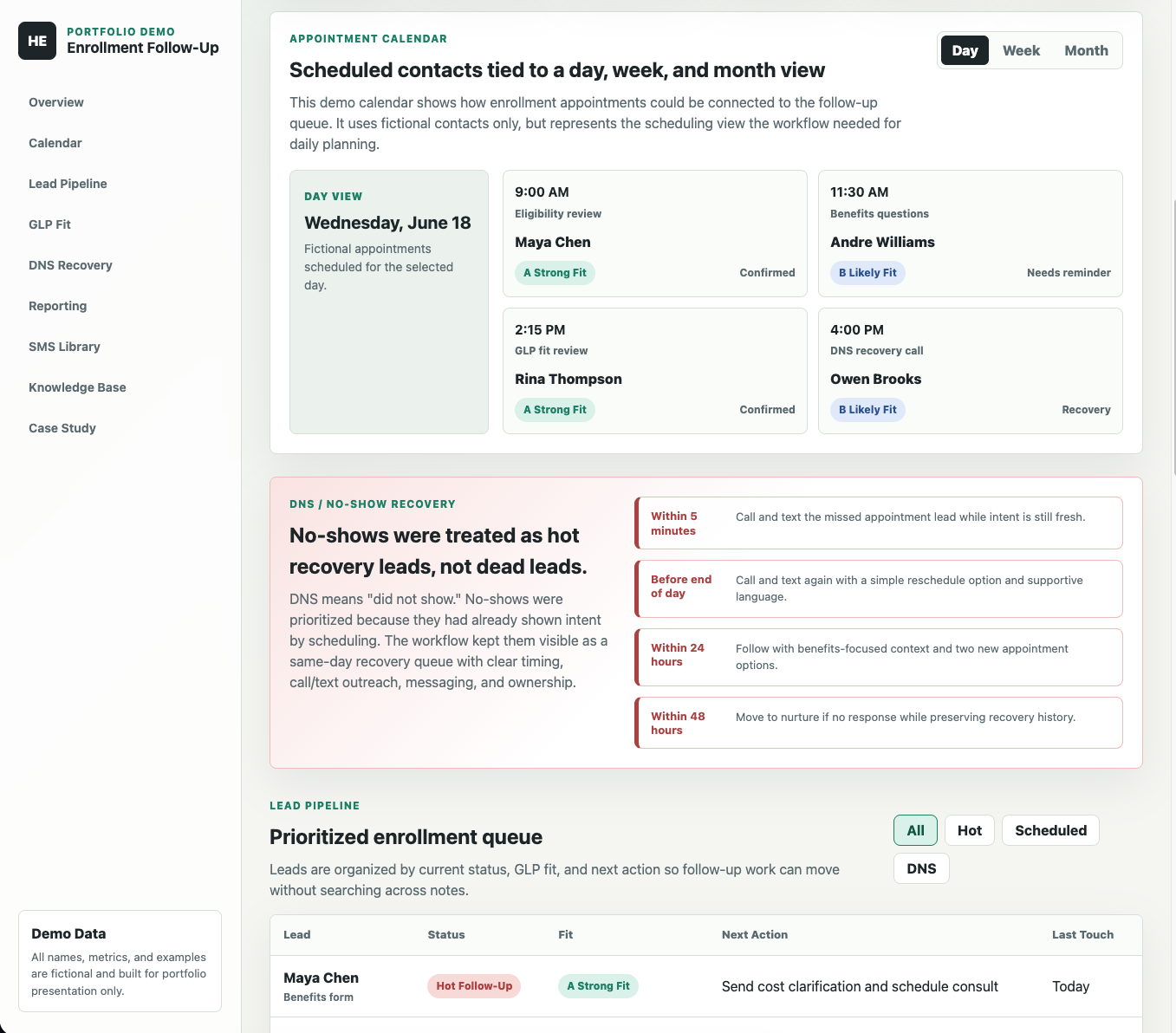
The K Health workflow showing the appointment calendar in day view with scheduled contacts and GLP fit tags, and the no-show recovery section below

The calendar and recovery view. Click to enlarge.

Everything a rep needed, in one place.

📅

Calendar

Scheduled contacts by day, week, and month, so each day could be planned around who we were actually meeting with.

đŸ—‚ī¸

Follow-up queue

Every lead with its status, fit, and next action, plus the full call history one click away.

â†Šī¸

No-show recovery

No-shows treated as hot leads, with a same-day rhythm at five minutes, end of day, 24 hours, and 48 hours.

đŸŽ¯

GLP fit

Simple A, B, C, D categories that guided who we followed up with first and made the reporting useful.

📊

Reporting

Conversion by fit category, so we could see which groups were enrolling and where the effort paid off.

đŸ’Ŧ

Message library

Reusable messages for the moments that came up every day, so we were not rewriting the same thing every time.

Take the guided walkthrough.

The demo is a fictional version of the workflow with an audio walkthrough in my own voice. It rings each section and walks you through what it did and why, start to finish.

Open the audio walkthrough  ↗

All names, metrics, and examples in the demo are fictional.

Once a rep could find everything about a customer in one spot, we stopped piecing context together across a spreadsheet and Salesforce before every call. That let us double our daily outbound calls. The time we used to spend hunting for context, we could finally spend talking to patients.

Notion Workflow Design Enrollment Ops Healthcare Reporting