Right now, I have twenty projects on my picker. Here's what's in flight this morning:
- A blog post about voice cloning, half-drafted.
- A motion-graphic video rendering for one of my showcase pages.
- Audio narration being re-cut across the site.
- Life at a Glance, the personal dashboard I run my own week from, has a cron job that needs a tweak before Friday.
Normally, managing four completely different creative and technical tasks at the exact same time would create total mental chaos.
You'd spend half your day just trying to remember where you left off on each one, or worrying about what's slipping through the cracks while you look away.
But I'm holding exactly zero percent of that stress or detail in my head. My system is running, tracking, and executing all of them in the background.
Building custom infrastructure to offload that mental burden so I can jump between 20 active projects without missing a beat - that's not a productivity trick. It's how I'm wired.
I worked this way long before AI tools existed.
Organization isn't a skill I picked up. It's my default setting, and it's the foundation that lets me give whichever project is in front of me my full attention, because nothing else is competing for space.
The State Lives in Five Places, Not in My Head
Every project I work on has the same project management system underneath it.
Database. Currently Convex, migrated from Supabase. This stores what's been done, what's still open, and what the next concrete step is.
GitHub repository. Every change with the commit message attached. Full history, every file, every project.
Session transcripts. The full back-and-forth of every Claude Code session, my prompts and the model's reasoning, saved automatically when the session ends. Searchable by date or topic.
Local working files. The actual artifacts the work produces. Code, documents, drafts, configs. Whatever the project is making, sitting on disk where I left it.
Apple Time Machine. An hourly snapshot of the entire machine running underneath all of it.
Five layers.
Each one a backup for the others, and each holds something different.
If any single piece broke down tomorrow, the others would still hold the state of every project.
The chance of losing work I've put in is essentially zero.
Twenty Projects, One Keystroke Away
Claude Code requires you to work in the terminal.
For over a year, I dreaded opening the terminal at all.
To start work on a project I had to remember the exact name and type it correctly, and if I came close but not exact, the shell would come back asking "did you mean OnTrak Call Guide or OnTrak Wix Site?".
I felt like I was spending more energy navigating to the work than doing the work.
The next challenge was staying on top of the projects themselves.
They lived in a database, and I'm a visual person (and perhaps a bit of a control freak?).
I needed to SEE the note was saved, the reminder was set, the work log was entered.
I solved this a couple years ago by building a project dashboard in Retool.
It had a clickable visual of every project I was working on. It populated from supabase.
When I clicked on a project name, a card would pop up showing me the work log history.
It helped, but it lived in a browser tab, not where the work actually happened. And if I wanted changes to UI, I had to do them manually.
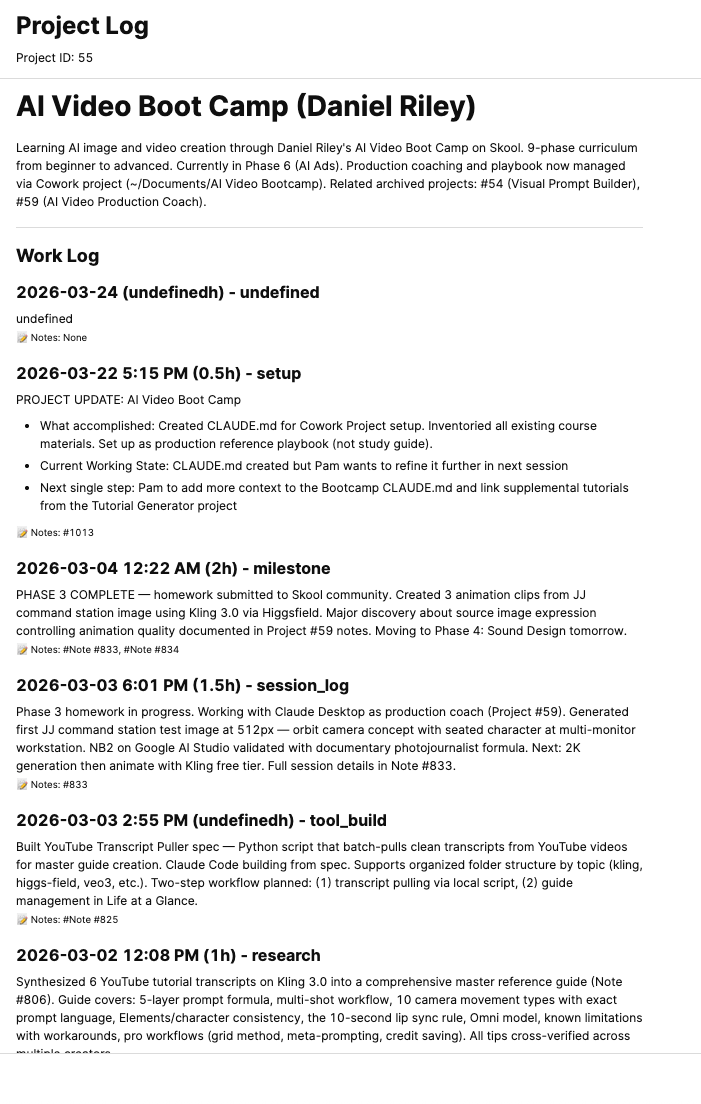
Inside Retool: click a project, see every session logged on it with the related notes.
Then I stumbled across Rio in one of my AI groups.
Open source, GPU-accelerated, color and transparency per window. I had a lot of fun setting it up, and eventually it took the place of both my old terminal (Warp Drive) and Retool entirely.
The picker came together in stages, one tweak at a time.
First, I had Claude number my projects.
I kept the list on a piece of paper on my desk:
#1 GoBot / JJ
#2 LataG Dashboard
#3 Claude Code Enhancements
Then I thought, why is the list on a piece of paper? I asked Claude Code to show me the numbered list inside Rio whenever I opened it, so I could just type the number.
Now the picker is open on my desk all day. Twenty projects deep, each one color-coded so I recognize it visually before I read the name.
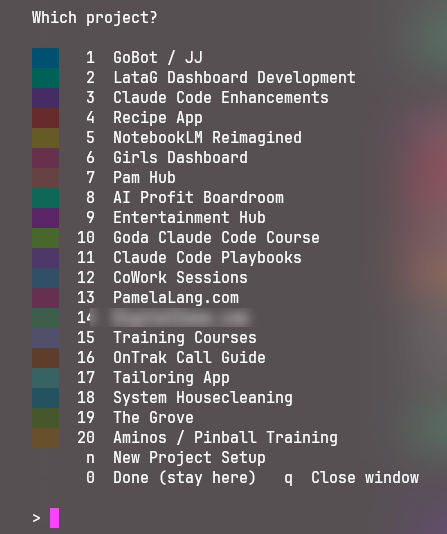
Twenty projects on the picker. Type a number, the right environment opens.
I type a single number, hit Enter, and a dedicated Rio terminal window opens. The window is instantly tinted to that project's color theme (see below).
That was great....but I still needed to go over to Retool to check what I'd done last on each project and see where it stood.
So I asked Claude to solve this too.
I wanted:
- What we finished last session.
- The current backlog.
- A direct recommendation on where I should start right now, and why.
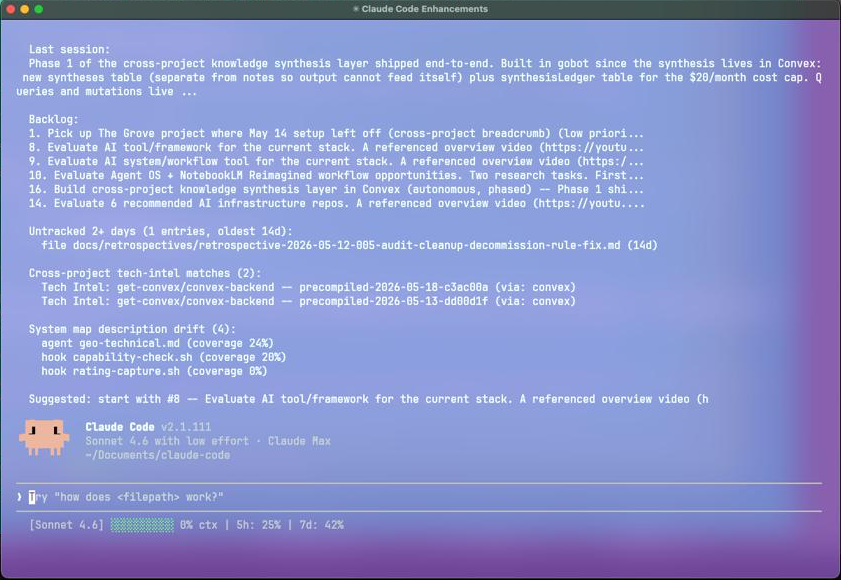
Open a project, the full briefing is already there.
In less than three seconds, without hunting through folders or straining to remember context, I'm fully engaged with the project.
Claude brings me up to speed, instead of me spending ten minutes bringing Claude up to speed.
Every piece of this came from removing one specific friction. Less time orienting to a project. More time inside it.
And along the way, I also included:
Untracked files older than two days. Drafts and notes I created but never committed. The briefing surfaces them so they don't quietly drift.
Cross-project tech-intel. Tool tips and release notes captured in another project that look relevant here. They bubble up automatically.
System map description drift. A nightly job compares my plain-English documentation against the actual code. When they disagree, the row surfaces so I can sync the two.
Inside a Session, the System Trains Itself
The window in the screenshot below is the lavender one. Claude Code Enhancements.
Each project has its own color so I always know which window I'm in without needing to read the title bar.
That visual layer is the fun part.
The rest of what's inside a session is the discipline part: rules I've trained the system to enforce.
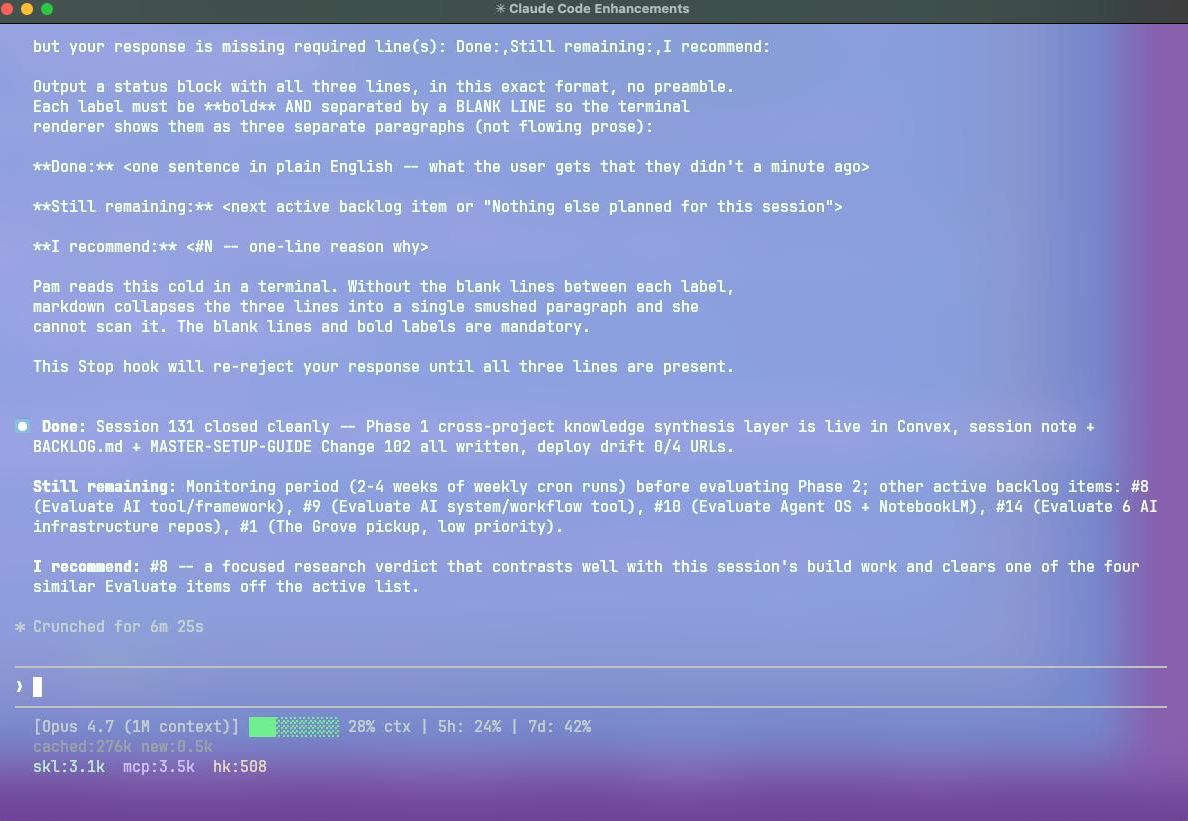
The check fires after a commit. The model wrote prose, the rule said no, here's the format Pam can scan. Redo.
In the top of the screenshot you can see where a hook kicked in and rejected the response the model was about to send - because it was missing the standardized status block I require at the end of every commit.
The check spells out the required format and explains why it matters: "Pam reads this cold in a terminal. Without the blank lines between each label, markdown collapses the three lines into a single smushed paragraph she can't scan."
Before the hook, I'd see a wall of text from one terminal window to the next, each one of them different.
There was no continuity.
It took me time to scroll up, read what we were working on and what the outcome was.
Then I'd ask what was left on the list, the recommended next step, and why.
It was clunky and time consuming. It was mentally draining after several hours of this.
So I created the custom hook, and now every window I go to finishes a task in the same way:
- 1Done. What we finished this session.
- 2Still remaining. What's left on the list.
- 3I recommend. What to start with next, and why.
Each label on its own line, bold, with blank-line spacing.
When I'm working on several projects at one time, it allows me to scan this in seconds and get my bearings.
I noticed a back-and-forth I was tired of, turned it into a rule, the rule became a check that fires before the response ever lands on my screen.
Capacity in Plain View
The bottom of every terminal window shows me where I stand in real time.

Model, context window used, 5-hour quota, 7-day quota.
Seven pieces of information live in that strip, all visible at the same time without me having to ask:
[Opus 4.7 (1M context)] -- which model is running.
39% ctx -- how much of the current conversation's memory is in use. Five percent means I just started. Eighty-five percent means I need to wrap this session up soon or risk losing the back half to compression.
5h: 28% -- my rolling five-hour token-usage window.
7d: 42% -- the rolling seven-day window.
cached:389k new:0.3k -- how much of the conversation is being read from cache (cheap and fast) versus new tokens being processed this turn. A high cached number means the model is reusing what it already knows about this session.
skl:7.7k -- how many tokens my installed skills are taking up in context. Skills are the custom slash-commands I've built (like /pm, /ghostwrite, /tailor); their descriptions load into every session.
mcp:3.5k -- how many tokens my connected MCP servers are taking up. MCP servers let Claude talk to outside tools (Convex, Playwright, Supabase, Google Drive, and so on).
hk:5.8k -- how many tokens my custom hooks are using. Hooks are the rules that fire automatically before or after specific tool calls; this is the cost of having them load.
I look at that strip several times a session without thinking about it.
It's the difference between closing a window on my own terms or losing details in the last forty-five minutes of work because I pushed too far and the conversation compressed.
How a Session Closes, So the Next One Opens Ready
The picker briefing in the cascade earlier doesn't happen by magic. It happens because every session I run closes the same way.
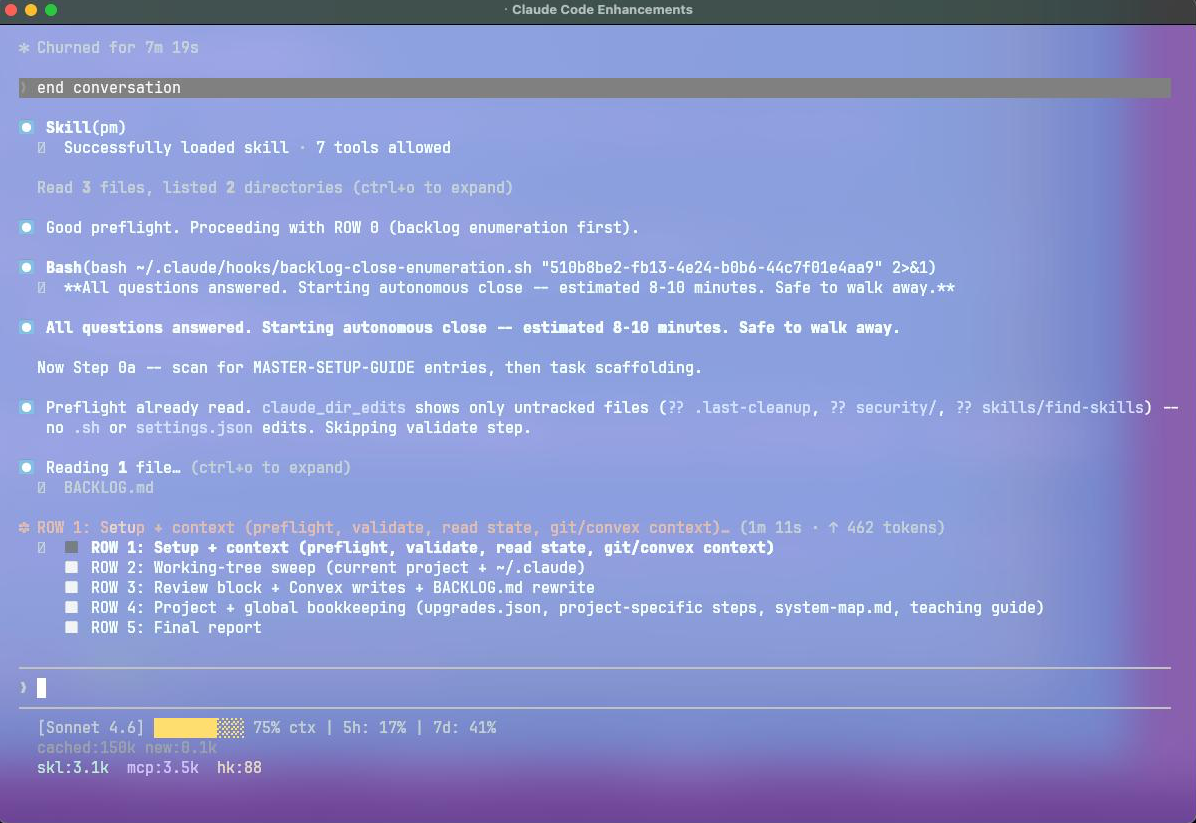
Type "end conversation" and the close cookbook takes over: preflight, backlog enumeration, working-tree sweep, Convex notes, housekeeping, final status.
I type end conversation and the system takes over.
I originally created this two or three years ago when I was working in Claude, first in the browser and then in the desktop.
I've added a lot to it since then.
Here's what happens now, in order:
- ✓Scans what was done this session.
- ✓Sweeps the working tree for uncommitted changes.
- ✓Writes a session note to Convex with what was accomplished and what's still open.
- ✓Updates BACKLOG.md.
- ✓Checks the system map for drift, so my plain-English documentation stays current with the actual code.
- ✓Runs any project-specific housekeeping tasks that project requires.
- ✓Produces a final report in a fixed format: Done, Still remaining, I recommend.
When I open that same project next time, the report I just wrote IS the briefing I showed you earlier.
Not a separate document anybody has to assemble - the close prepares the open.
Most of what's in this post grew when I found myself repeating instructions.
I didn't want to hunt for folder names. I didn't want to ask "where did we leave off?" every single time.
I didn't want to negotiate which project we meant.
Every part of this system started as friction - an opportunity to streamline my workflows.
Imagine This
Picture a row of physical folders on your desk.
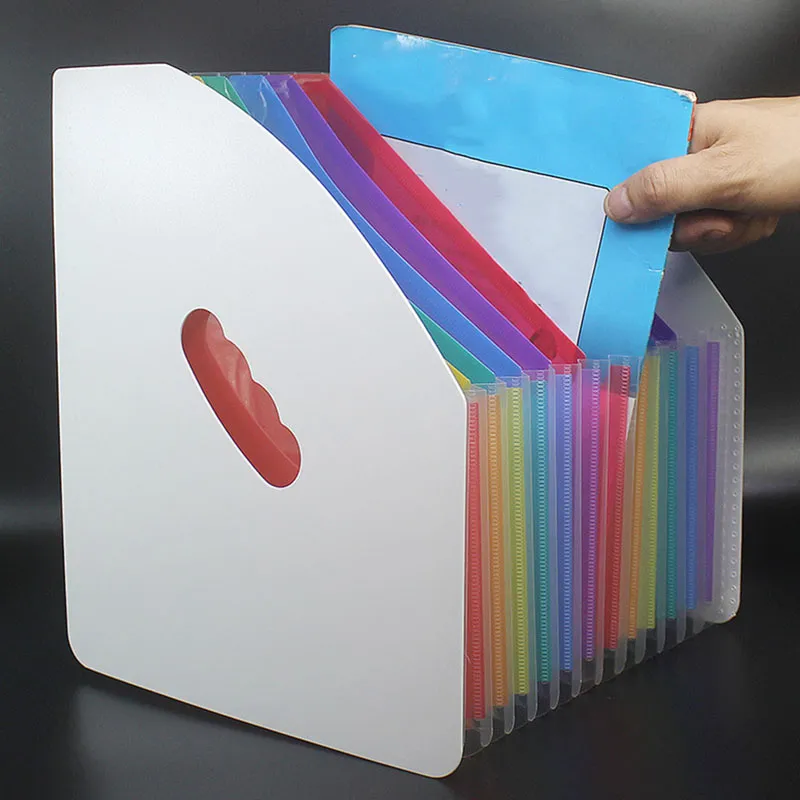
A folder can't do work. Paper holds notes; it doesn't act on them.
You open the top one and write a note inside: write me a blog post about this topic.
You close it and set it aside.
You open the next folder and write: build me a clone of my voice.
Close it.
The next: make a motion-graphic intro for a showcase page.
The next: rewrite the audio narration on these three posts.
You walk away.
You come back three hours later expecting to find the work done.
What you find is your notes, exactly where you left them.
Nothing has happened.
Because five years ago that idea was absurd.
A folder can't do the work.
The paper doesn't act on the note. It just holds it.
Flash forward to today:
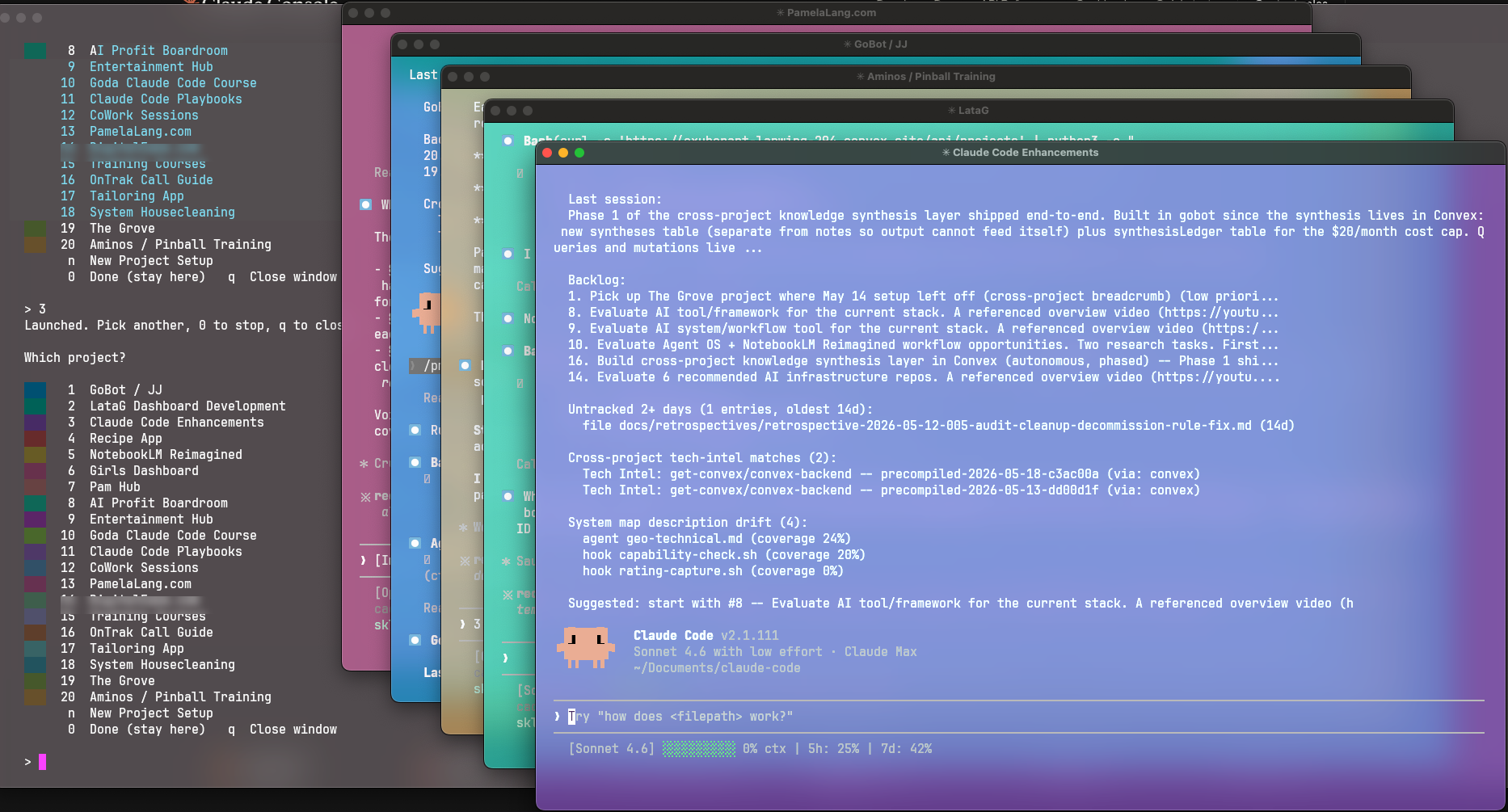
Five terminal windows running five different projects. None of them in my head.
Five of my color-coded project folders, open and running independently.
Every single task I dropped in is actively being built right now.
I open a folder in the form of a terminal window and write a note telling it what to do.
I move on, open the next folder, write the next note.
Rinse and repeat. Move on, open the next folder, write the next note.
By the time I circle back around, the first folder has finished its task and I can give it another one.
The folders read the notes....then they do the work.
Every one of those folders was built the same way.
When I'm ready to add a new project, I give Claude the idea and ask it to add it to the picker.
I have a skill for this - a custom slash command called /new-project.
Here's what it builds:
- A README - what the project is and how to run it, written for a human
- A CLAUDE.md - the rules, the tech stack, the pitfalls, written for the AI
- A BACKLOG.md - the living list of what's open, in progress, and done
- A transcripts folder - where every session's full conversation is saved automatically
- A Git repository - initialized and connected to GitHub
- A Convex registration - a project record in the database, with a unique ID wired into everything that needs to know about it
- A picker entry - color-coded, numbered, and added to the project picker in Rio
Same scaffolding, every single time.
I don't have to remember what goes inside a new project folder.
Claude does all the heavy lifting.
My only job is coming up with the ideas and keeping things organized.
I have the organization part down.
There's no limit on this anymore.
The system can scale because the foundation underneath is solid.
The Bird's-Eye View, for Planning Days
The terminal is what I use when I'm working.
When I'm planning, or stepping back, or deciding what to pick up next, I look at the dashboard.
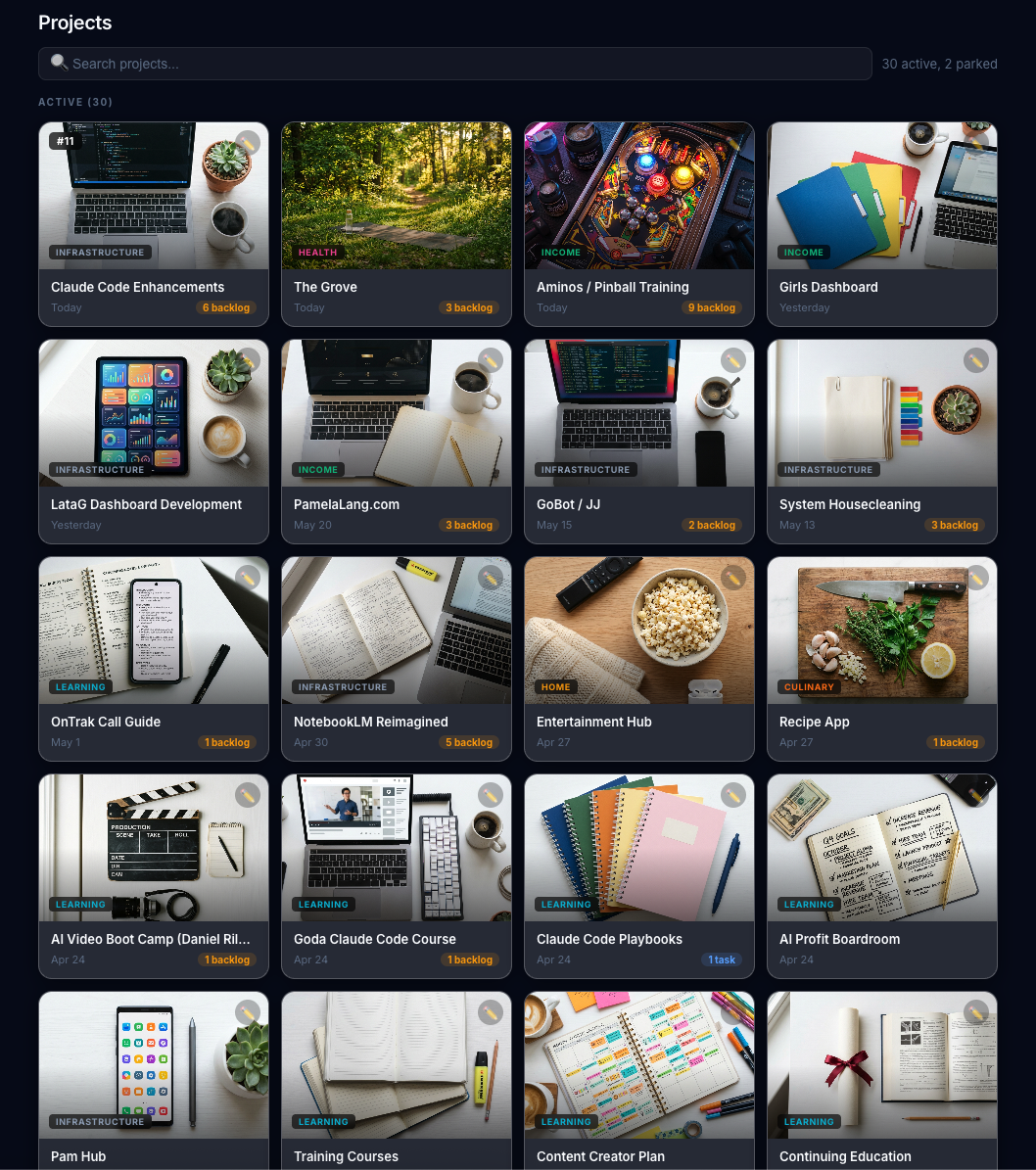
Every active project as a tile. Last-touched date and open backlog count visible at a glance.
Every active project gets its own tile. At a glance, each tile shows me:
- ✓Category in the corner.
- ✓Date I last touched it.
- ✓Number of open backlog items.
If I'd like more detail, I click on the tile and the full project opens up:
- ✓Project description and current state.
- ✓Every backlog item with what done looks like and where to start.
- ✓What we did last session.
- ✓Any note that pertains to that project.
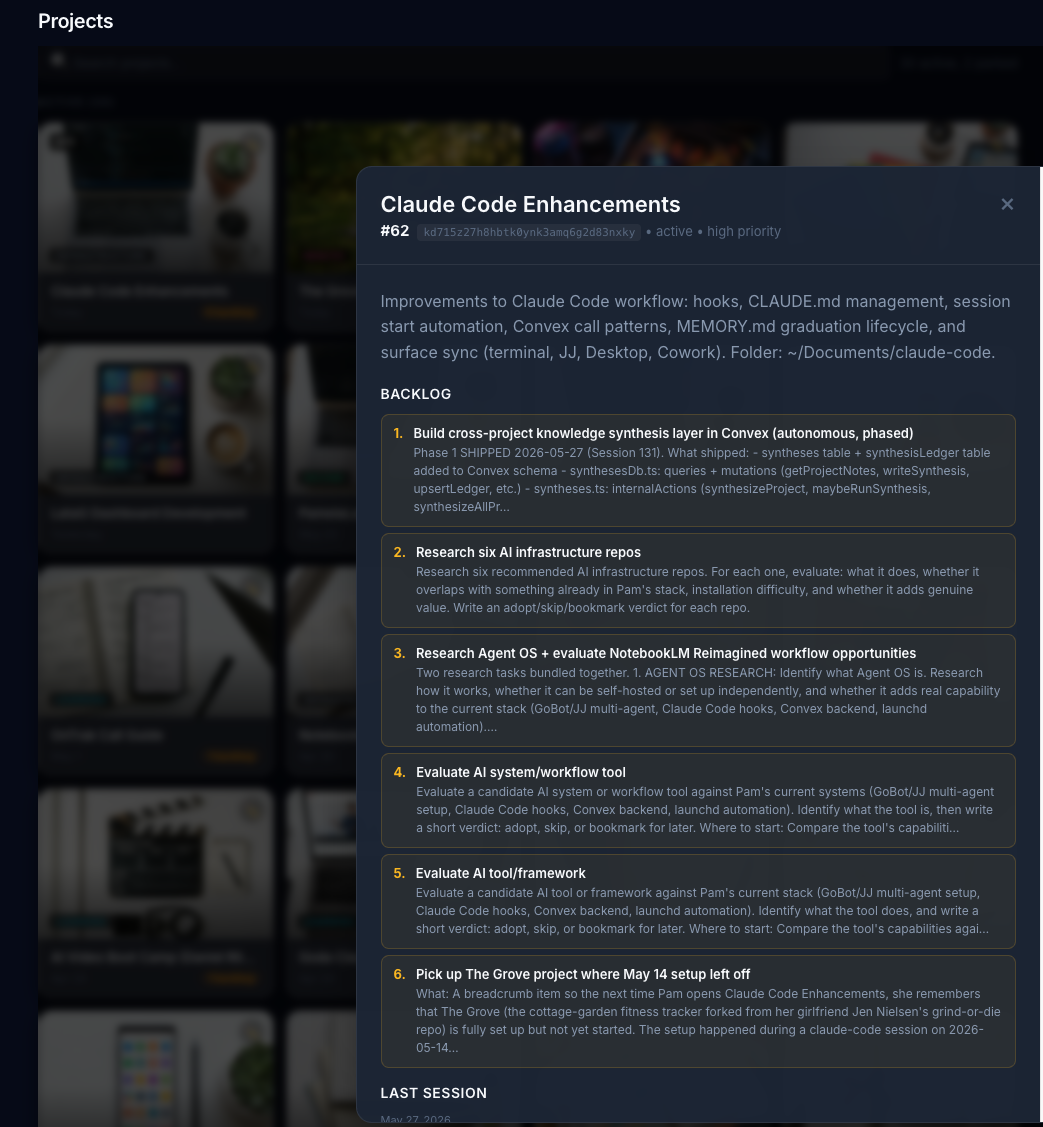
Click a tile, see the backlog. Each item written so a future me with zero context can pick it up.
Every Backlog Item Is Written for a Stranger
This is the discipline that makes the rest work.
Every backlog item is written so a future version of me, with zero memory of today's context, can read it and pick up the work without missing a beat.
That was also born out of necessity.
Claude thought it was writing the notes for me.
It was actually writing them for itself.
Claude kept telling me it wouldn't forget. "I've made a note of that." "I'll remember."
And then, every single session: "Can you fill me in? I don't recall the details."
I'd say: "what do you mean you don't recall the details - you're the one who wrote the note."
Claude: "I did write a note. But only the subject line. I need help with the details."
Every.
Single.
Time.
Here's the thing about AI: the moment you close the window, the details are gone.
It's gotten better about recalling some things, but there's a limit to that.
And for the amount of work we're doing - the number of sessions, the number of projects - there's no way it could hold all of it.
So I built a system around that. Cold-read notes. Everything written as if the reader has never heard of this project before.
Because one of us hasn't. 