In my previous post on the dashboard I shared what 30 days of my own Claude Code data revealed. What I didn't get into in that post was the Tips page itself, where the dashboard surfaces specific suggestions about how I'm working. The tips come in a few categories, and one of them, the right-size tip, is what turned my data into a model-selection framework.
Repeat-file tips
Files I open over and over across sessions. CLAUDE.md read 59 times in 7 days is a recent one. The suggestion: a summary would save the repeated reads.
Repeat-bash tips
The same command running hundreds of times across sessions. Each one a candidate for a hook or a small script that does it once and caches the result.
Right-size tips
Opus turns that produced such short replies they would have run fine on Sonnet, with the dollar math attached so I can see the cost of running heavy when light would do.
This post is the framework I built from it.
Here's this week's right-size tip, as the dashboard shows it (a turn is one message to Claude and the response that comes back):

The dashboard right-sizing tip, in detail.
1,606 short Opus turns at about $268 a week if those turns were billed at API rates. About $54 if they had run on Sonnet. A $214/week gap on work that didn't need the heavy model. The number is lower than my usual week because I was offline for two days moving my office. On a normal week the gap runs higher.
The framework answers three questions: When does Opus actually earn its context window? When does Sonnet give me the same outcome for a fraction of the run? When is a session about to hit the wall, and how do I see that coming?
What I changed
I tried switching. I started opening every session in Sonnet, planning to escalate to Opus only when I hit something Sonnet couldn't handle.
Then Anthropic changed how Sonnet's 1 million token window is offered. It's still available, but it now draws from usage credits at API rates instead of coming with the plan, while the included Sonnet window dropped to 200,000 tokens. Opus still comes with the full 1 million on the plan. So for long iterative sessions, Opus became the practical way to keep that much context without paying per token. My workflow rebalanced.
Here's the move I settled on:
- Open every session in Sonnet by default.
- Run my morning
/pm(project management skill) brief in Sonnet. That routine burns through small focused turns, the kind of work Sonnet handles best. - Switch to Opus for long-context iterative work, where the 1M context window earns its keep.
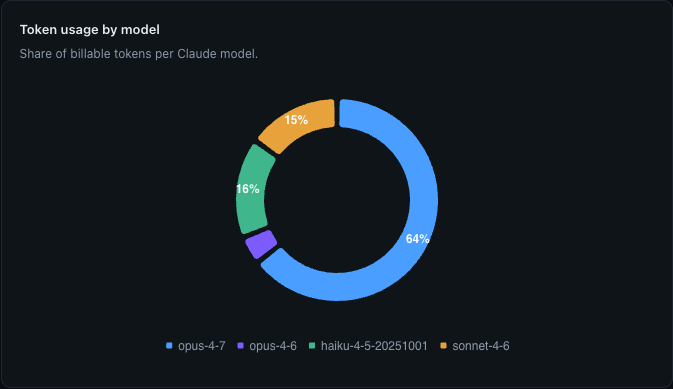
Token usage by model. Heavily Opus-weighted, which is exactly what the framework is responding to.
The deciding factor is the shape of the session. A 100-turn iteration where I'm reading the same files over and over needs the 1M context window. A quick /pm check or a batch config edit doesn't.
The framework, generalized
My setup is one implementation. The decision rules behind it apply to anyone using Claude Code seriously, regardless of which projects they run.
Open in Sonnet when:
- The session will be short, under roughly 50 turns.
- The work is routine: a project management brief, a batch edit, a config check, a small refactor.
- Output will be short replies, not long-form drafting.
Open in Opus when:
- The session will be long, over 100 turns of iterative work.
- You'll be reading the same files repeatedly across many turns.
- You need the 1M context window to keep a large codebase or a long design conversation in scope.
- You're exploring or doing a multi-file refactor where context loss would cost you.
Escalate from Sonnet to Opus when:
- A turn would benefit from context Sonnet can't hold (the 200K window has filled up).
- You hit a complexity wall Sonnet can't get past on the first try.
- The session is about to turn into a long iteration rather than a quick check.
What I would tell anyone using Claude Code seriously
If you're using Claude Code daily and you haven't measured your own usage, you're flying blind. I'd been flying blind for the first three weeks of April.
Let the data decide which model to open, instead of guessing.

What comes next
The next post in this series walks through the workflow I'd already built for Claude Code before the dashboard came along: the terminal setup, the project picker, the cross-session memory, the parallel agents safety net. The dashboard didn't create that workflow. It refined one decision inside it, which model to open a session in.