One Stained Sticky Note. Four Clean Recipes In Your Library In 30 Seconds.
The AI sous chef that imports any recipe in seconds, knows what's in your kitchen, and tells you what to make tonight based on what you actually have -- all for $7.
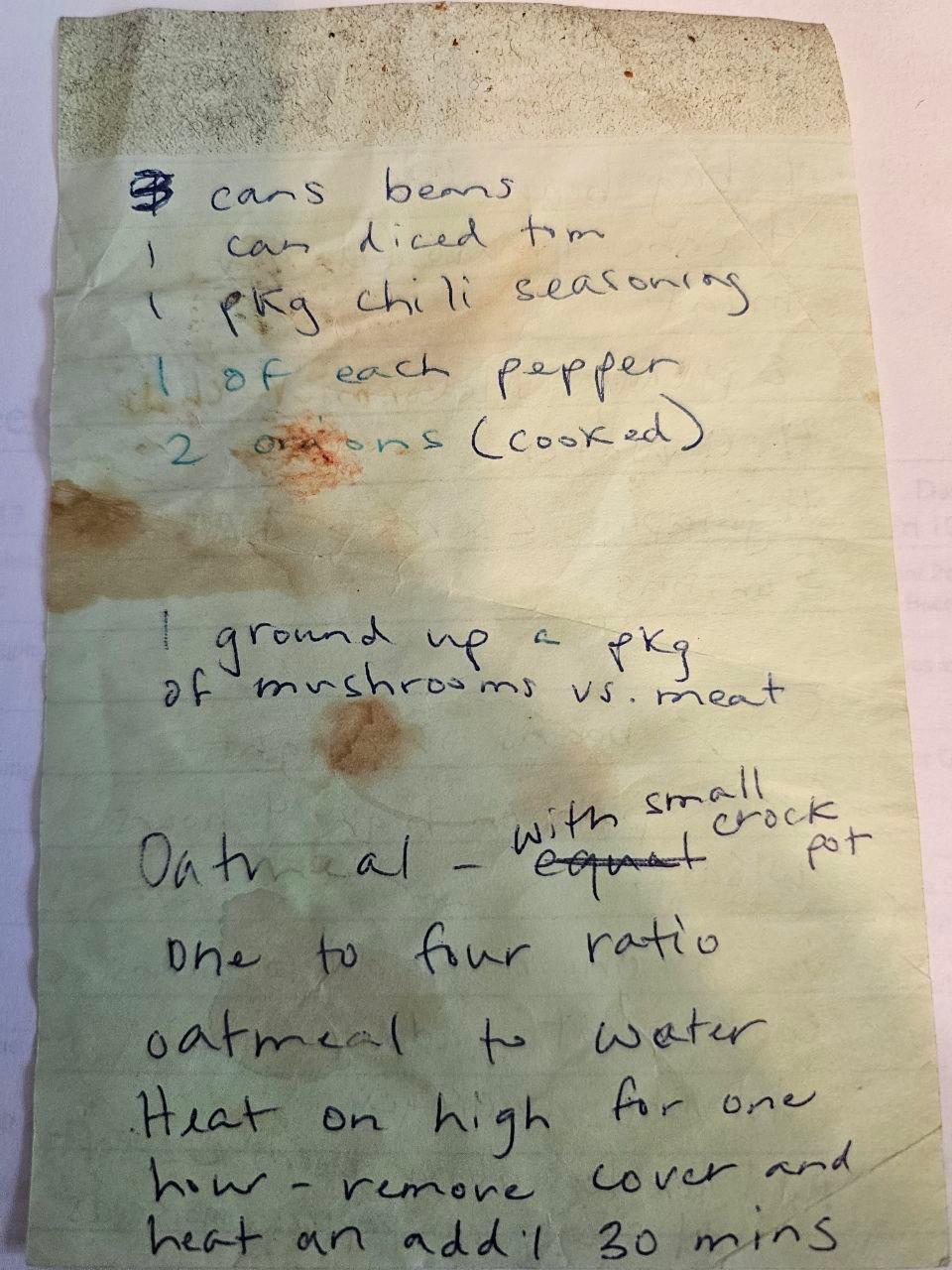
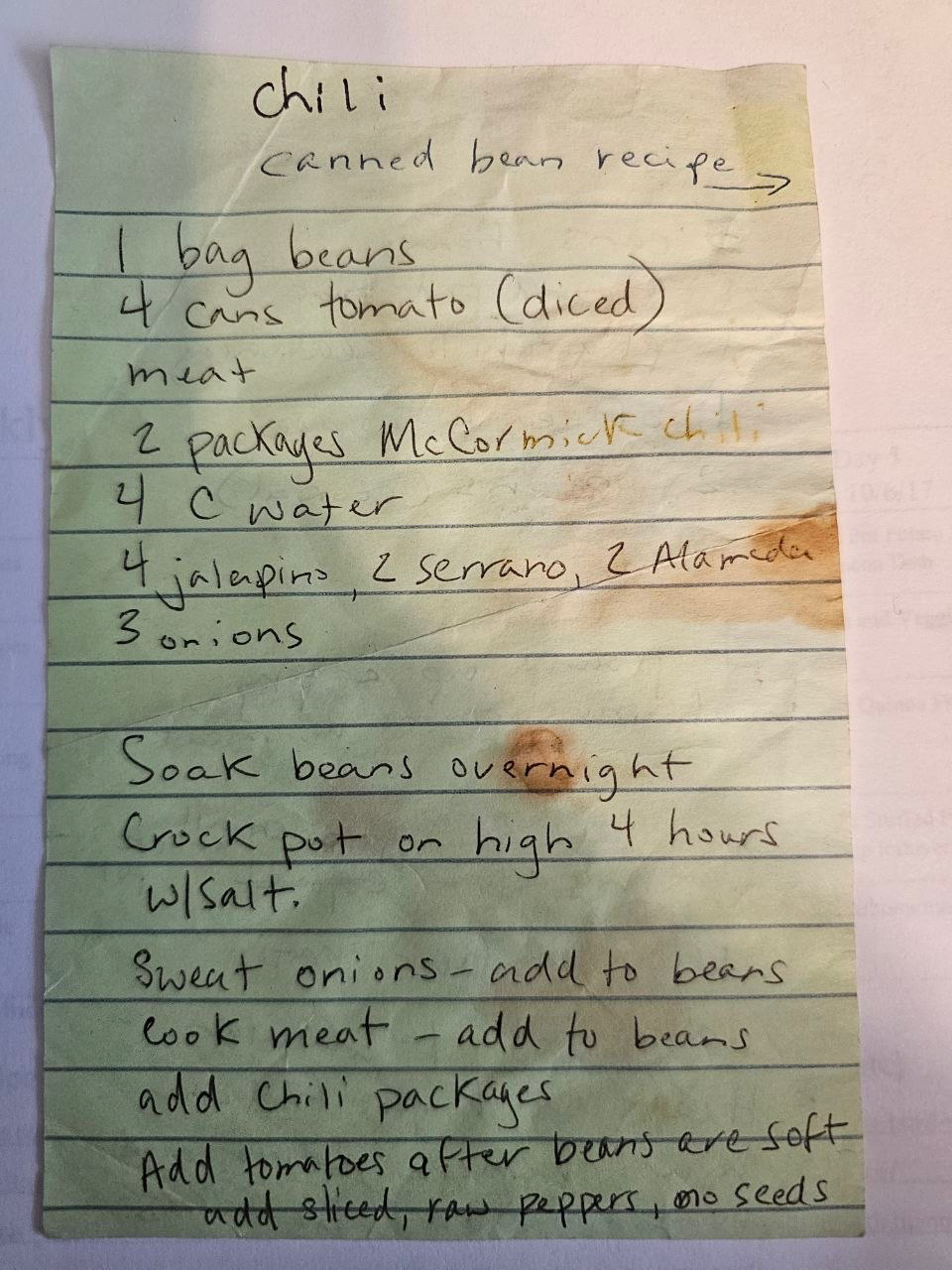
"This sticky lived in my kitchen drawer for years. Now it lives in my pocket."
Get Instant Access for $7 →90 days free, then $4.99/mo (founding rate, locked in for life)Every home cook has the same problem at 5:47 PM. The fridge is full of half-used ingredients. The recipe is on a stained sticky note in the junk drawer, a photo of a magazine page, a link a friend texted, or trapped in your own head after you riffed off something last week. And you've still got 20 minutes to figure out what to make.
What if your phone solved all of that? Snap the card. Paste the link. Talk to it. Ask what to make tonight from what's already in your fridge -- and get real answers in your own voice.
Why this matters more than ever:
-
$1,500The average American family throws away $1,500 worth of food every year -- most of it ingredients that expire before anyone figures out what to do with them.
USDA / ReFED -
35 minAdults spend over 35 minutes a day just deciding what to eat -- more than four full hours a week stuck on the same question: what's for dinner?
National Library of Medicine, decision-fatigue research -
82%82% of home cooks say they have favorite recipes they never make because they can't find them when they want them -- they're trapped on sticky notes, screenshots, and blog tabs.
Cook With What You Have, kitchen-survey research
The food is in your kitchen. The recipes exist. The problem is getting them into one place and getting answers fast enough to actually cook.
This app solves that.
CLAIM MY FOUNDING BUYER ACCESS →The hard part is figuring out what to make.
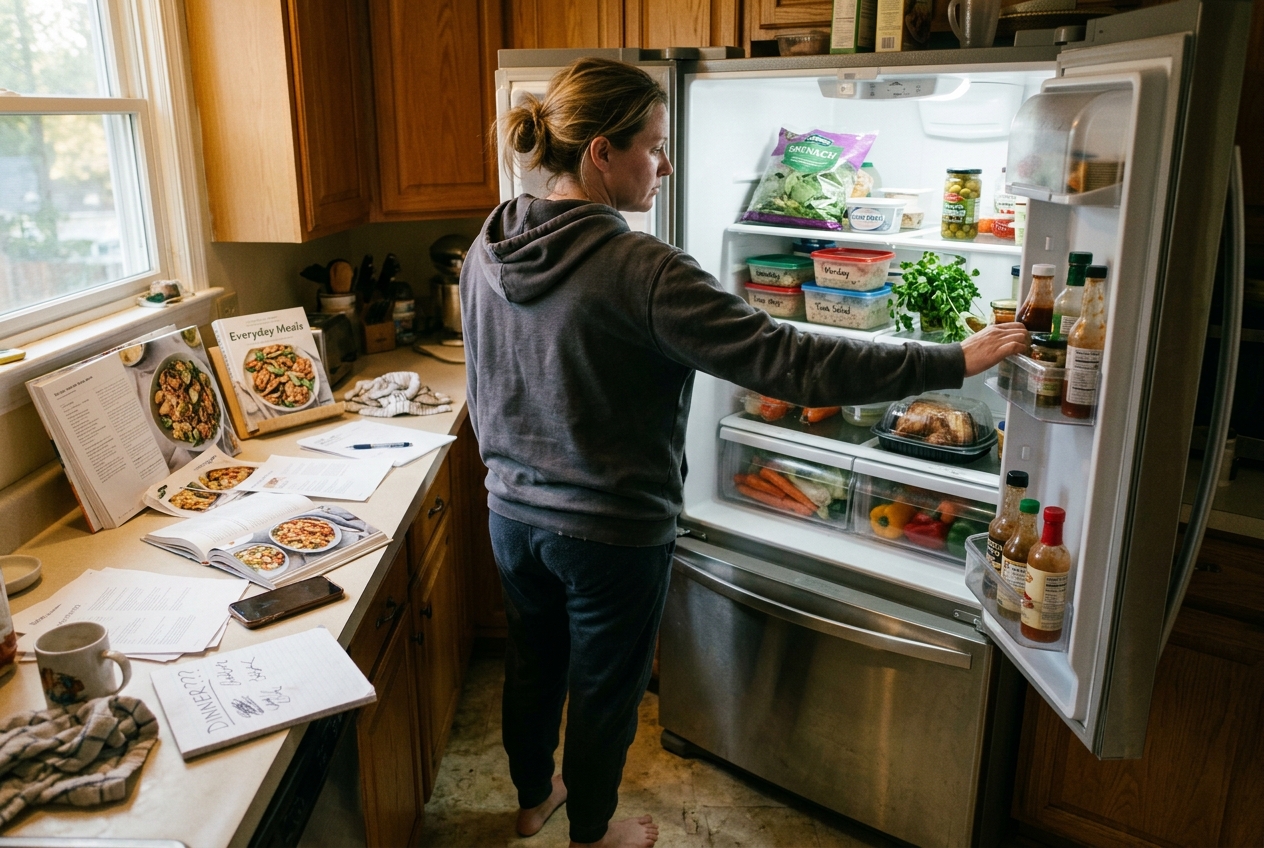
5:47 PM. The universal "what's for dinner" stare. Cookbooks open, printouts scattered, fridge already opened twice.
Most recipe apps make this worse. They show you 50,000 recipes you don't have ingredients for. You scroll. You compare. You give up and order takeout for the fourth time this week.
This is what it looks like solved.
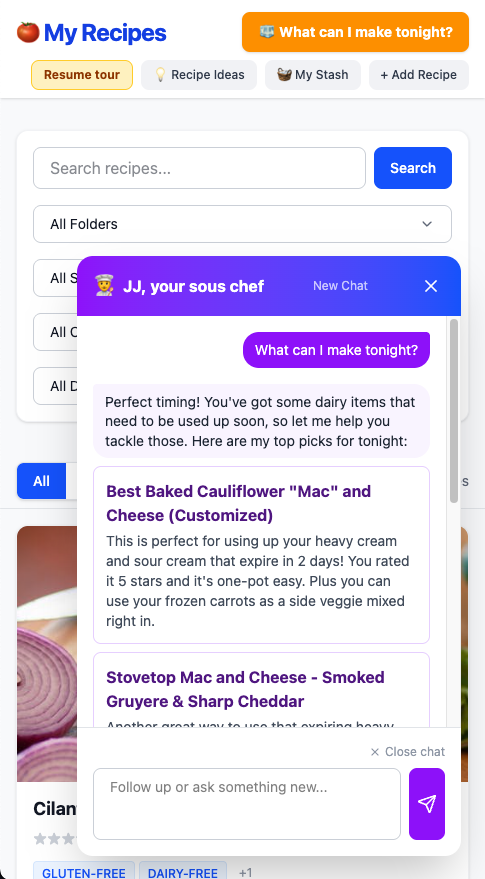
Same 5:47 PM. One question. A real answer that knows your kitchen.
You ask "what can I make tonight?" The AI sous chef leads with what's about to expire (heavy cream and sour cream that turn in 2 days). It recommends a recipe you rated 5 stars. It even points out the frozen carrots from your stash that would work mixed right in. No scrolling. No comparing. No takeout.
Then it tells you which spices to reach for.
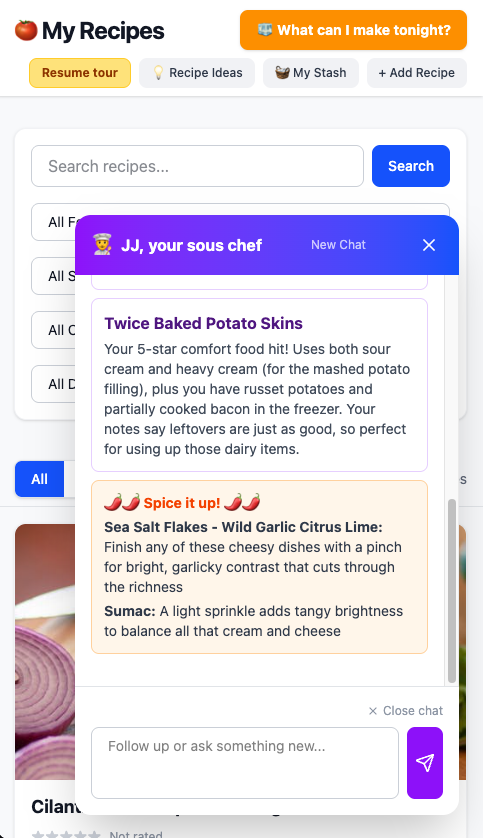
Every recipe recommendation comes with a Spice it up panel that pulls from your spice rack.
Gone are the days of buying a spice for one recipe and never touching it again. The app remembers every bottle on your shelf and recommends which ones to reach for, on every meal it suggests. The Wild Garlic Citrus Lime sea salt you bought eight months ago? It's about to finish a cheesy dish. The Sumac that's been sitting there? It's going to brighten the cream. Every spice gets used.
That's the whole pitch. It knows what's actually in your kitchen, it knows what you like, it knows what's about to expire, and it answers the only question that matters: what should I make for dinner, with what I have?
Four ways in. Zero typing.
Paste a URL
A blog post you love. Paste the link, hit Fetch. The app pulls in ingredients and instructions, ready to save.
Snap a photo
Handwritten card. Magazine clipping. Scanned cookbook page. Snap up to four photos per recipe -- it reads them all as one.
Import many at once
Paste a list of links. Watch the app process them in batch while you do something else. End of the day, your library is full.
Just talk to your AI sous chef
Hit the microphone. Ramble about the dressing you just invented. The AI sous chef saves it like someone who was paying attention.
The sticky-note moment: see it work
This is the part that takes this over the top. The hero image you just saw at the top? Here's the back of the same sticky.
Front and back of one sticky. Four recipes on it: three chili variations plus an unrelated oatmeal.
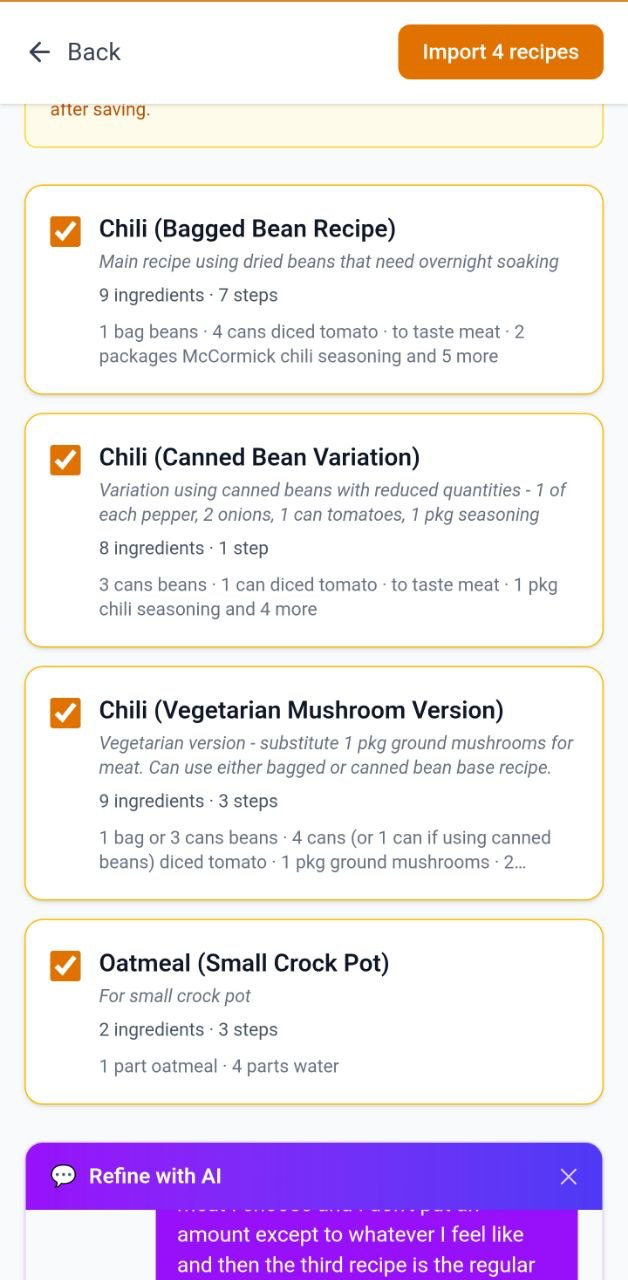
Most AI would merge it into one Frankenstein dish. This one talked it out. It guessed two recipes the first time. I dictated a correction in plain English ("you missed the oatmeal, there are three chili variations plus the oatmeal"). One message later: four clean recipe cards, each with its own auto-picked photo.
Four clean recipes, detected and ready to save. From one stained sticky.
Grab the Recipe App for $7 →90 days free, then $4.99/mo (founding rate)Or skip the photo. Just talk to it.
The microphone is the fastest way in. Ramble about something you just made. The AI sous chef listens, saves the recipe with the right structure, and replies like it was paying attention.
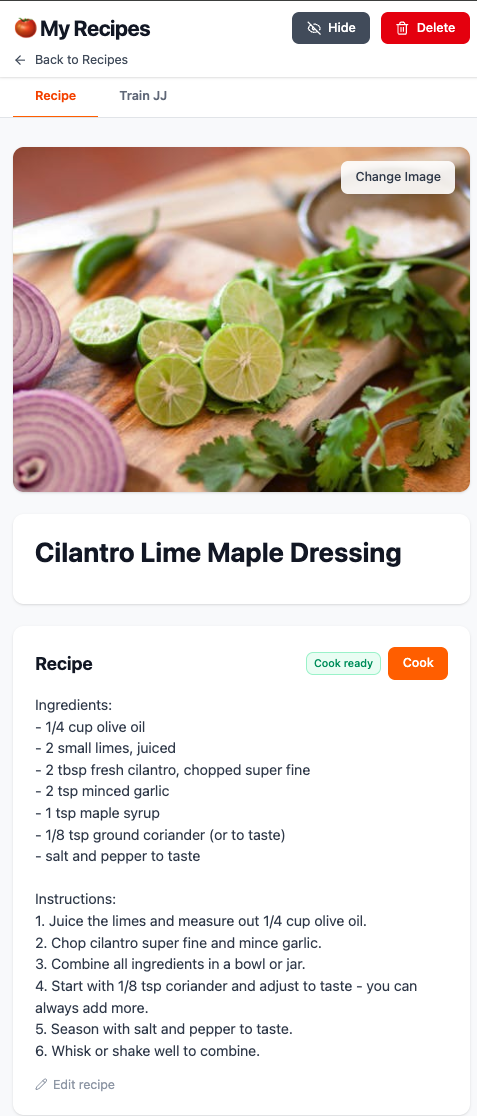
A rambling voice memo, in. A structured recipe with a photo, out.
Here's how a real Tuesday night works:
Ask "What can I make tonight?"
Open the app. Hit the microphone or just type the question. The AI sous chef leads with what's about to expire in your fridge and gives you three real options -- each one grounded in what's actually in your kitchen stash.
Tap the one that sounds good
Get the full recipe in your own library, ready to cook. No new tab. No searching. No "do I have all the ingredients?" check -- you already do.
Hit Cook Mode
The screen stays awake. Instructions appear one step at a time in big readable type. Back and Next buttons large enough to knuckle-tap with greasy hands. Mise en place laid out before the first chopping step. You're set up before you touch a knife.
Total decision time: under a minute. Total takeout orders avoided: one more than yesterday.
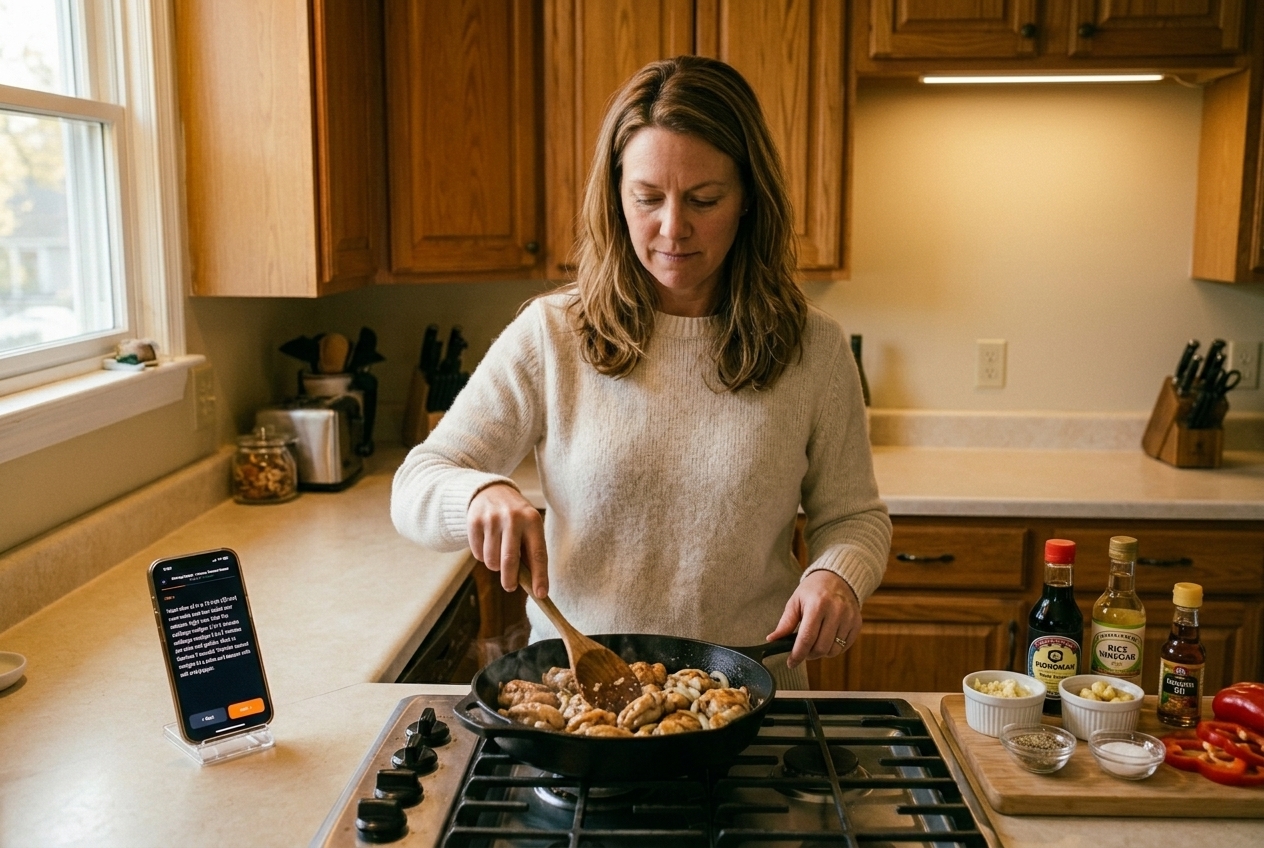
Phone propped, hands stirring. The screen holds the next step in big type and stays awake.
Start Cooking Smarter for $7 →90 days free, then $4.99/mo locked in for lifeYour Kitchen Stash. The app's secret weapon.
The app keeps a running inventory of everything actually in your kitchen -- fridge, freezer, pantry, and the random garage shelf with the costco overflow. 193 items in mine right now. Yours will be different.
Walk around your kitchen with your phone. Snap the pantry shelves. Talk what's in the freezer into the chat (because the freezer is the one with the half-bags and the vacuum-sealed packages). Either way, it lands in your stash.
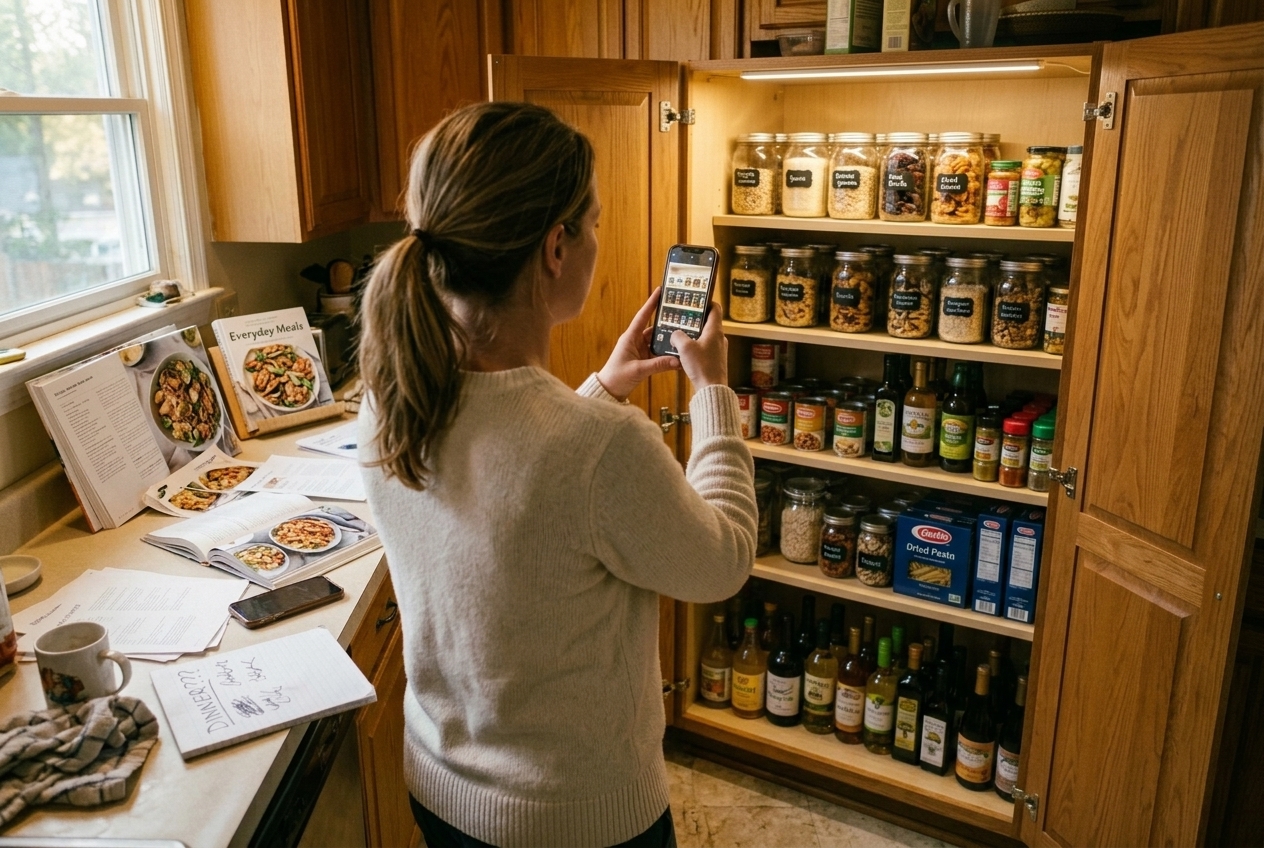
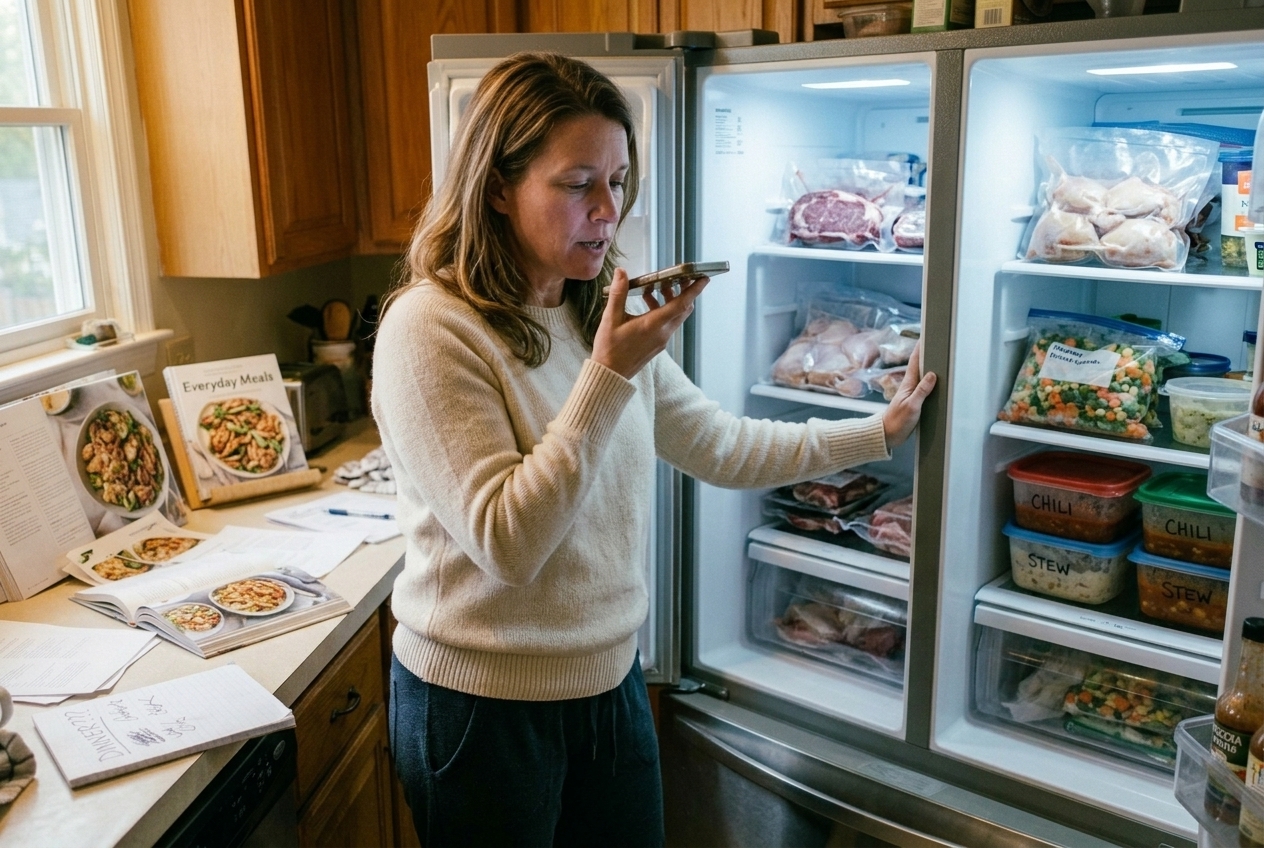
The Expiring Soon tab flags what needs using first. Tap "Want to use up" on any item and the AI sous chef prioritizes recipes that use it.
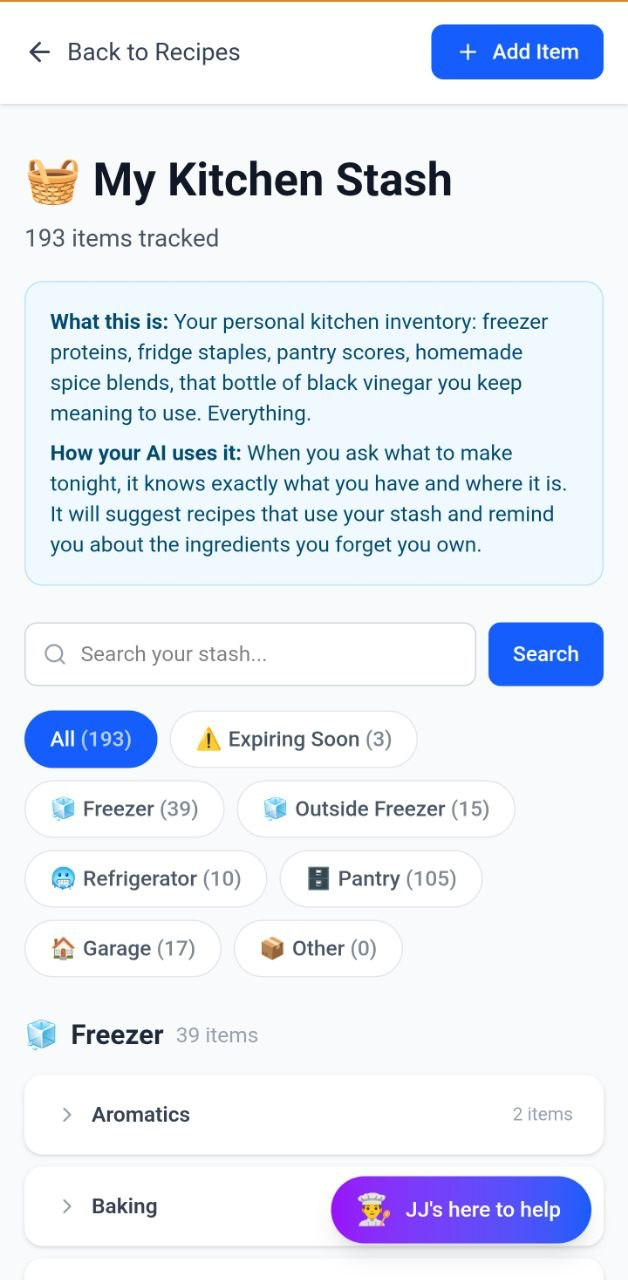
193 items, grouped by where they actually live: fridge, freezer, pantry, garage.
That weird bottle you bought once? It'll get used this week.
Here's the part that takes this over the top. The bottle of Chinese black vinegar I bought two years ago for one recipe and never opened again? I checked "Want to use up" and tapped Suggest usage ideas. Here's how the conversation went:
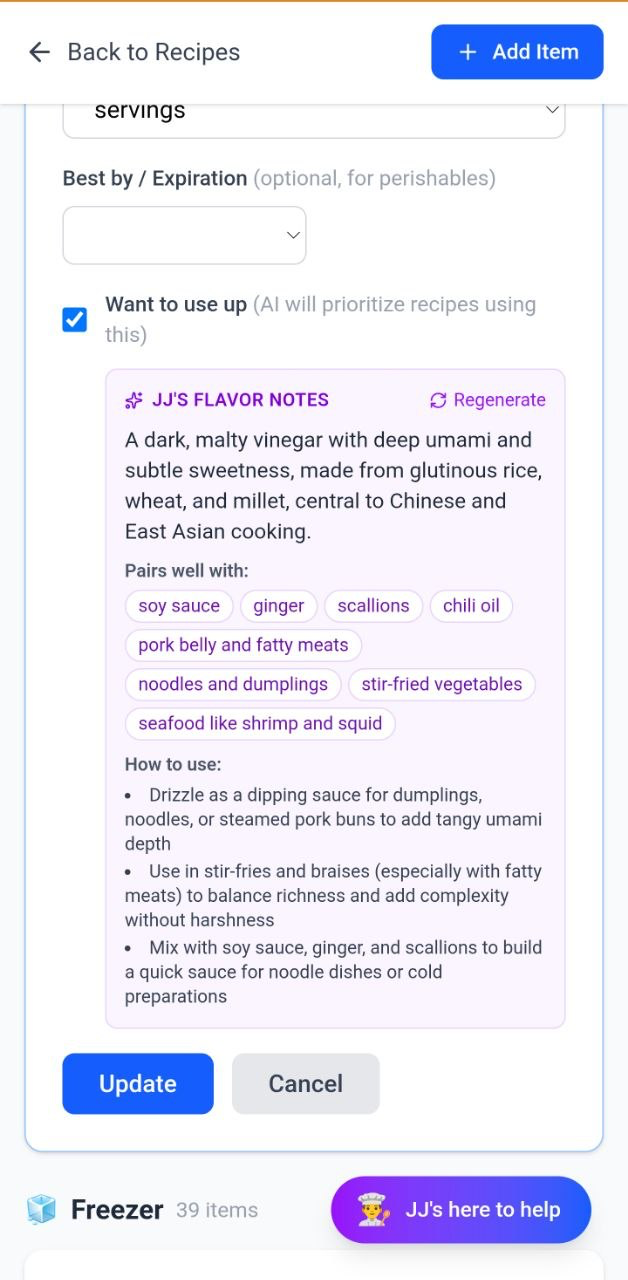
The flavor profile gets stored on the ingredient. You don't pay for the research twice.
A day later I said "I'm craving Asian." Without me asking, the sous chef remembered:
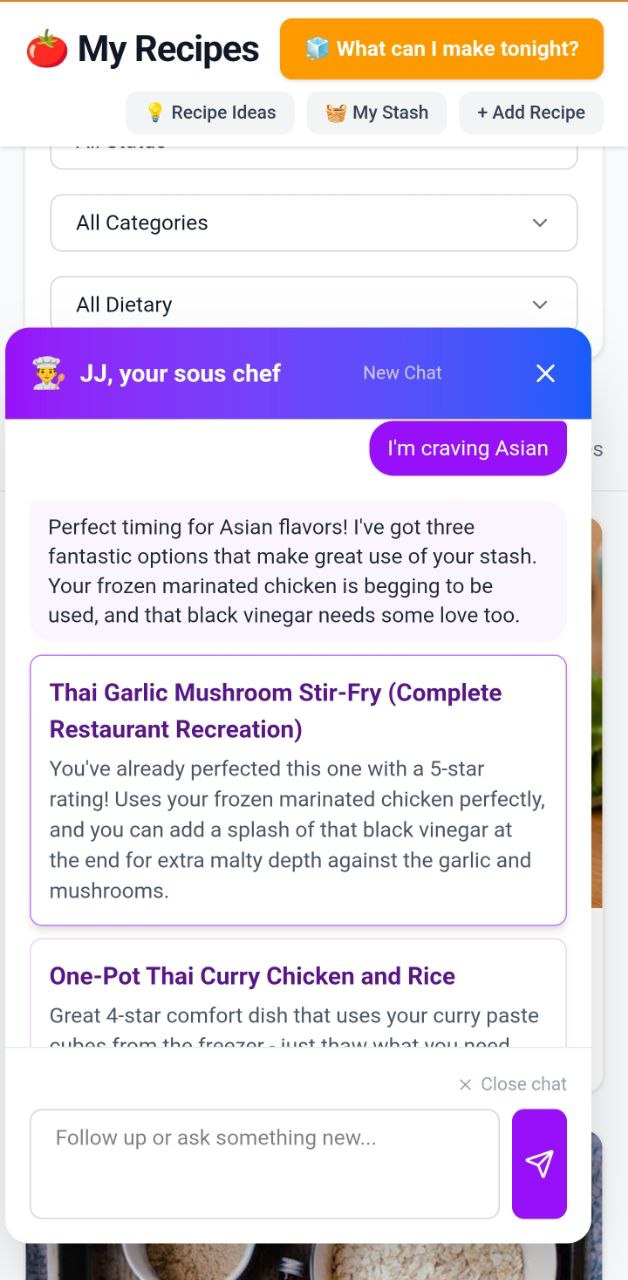
It remembered the vinegar. It remembered the chicken. It built the recipe around both.
That $14 bottle that sat in your pantry for two years is suddenly part of dinner. So is the half-bag of frozen chicken. So is the leek that's about to go soft.
STOP WASTING GROCERIES -- GET ACCESS FOR $7 →Train your sous chef. The more you use it, the more it sounds like you.
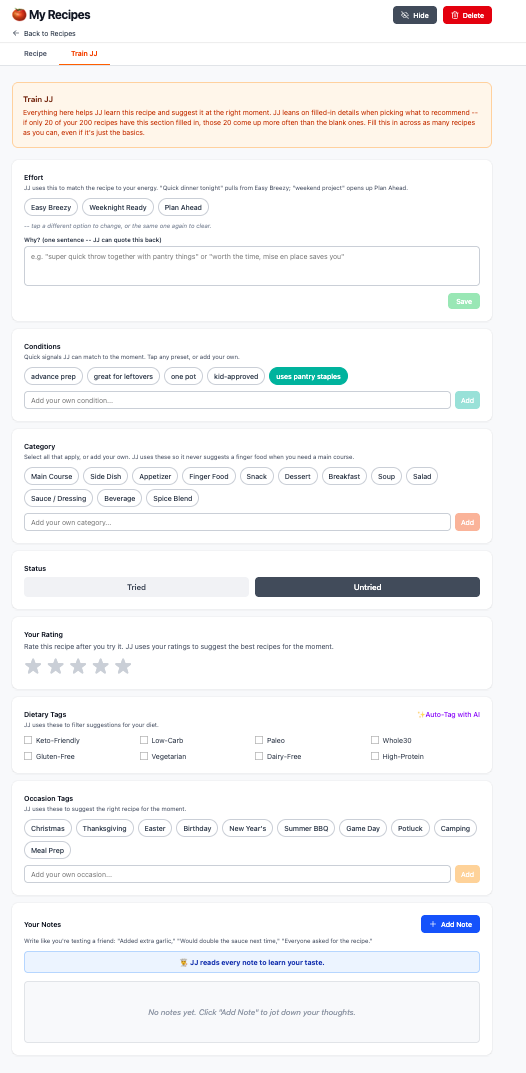
Every recipe in your library has a Train tab. Tag it the way YOU think about food, jot down a few notes after you make it, and the sous chef learns. The next time you ask "what's for dinner," it pulls the right recipe for the moment AND quotes your own words back to you.
 Click to enlarge
- Effort -- Was it easy breezy? Weeknight ready? Or a plan-ahead meal? Tag it once and "I want something quick tonight" pulls from Easy Breezy automatically.
- Conditions -- Is it one pot? Kid-approved? Does it use pantry staples? Great for leftovers? Tap any that apply or add your own.
- Category -- Is this a main dish? A side? An appetizer? A snack? A dessert? A sauce? Tag as many as fit. (A dip can be a finger food AND a snack AND a side.)
- Rating -- Five stars. If it's not a 4 or 5, get it out of your recipes. Your library is for the ones you actually love.
- Dietary tags -- Is it keto-friendly? Low-carb? Paleo? Whole-30? Gluten-free? Vegetarian? Dairy-free? High-protein? Tell the sous chef once and every future recommendation respects it.
- Occasion tags -- Birthday? Potluck? Summer BBQ? Game day? Camping? Meal prep? Pick what applies, add your own.
- Notes -- Write like you're texting a friend. "Next time use half the vinegar." "I ate two bowls and could have kept going." The sous chef reads every single note.
A week later, you say "I have some cilantro to use up."
Your sous chef responds:
“I have a dressing recipe where you wrote this one makes you excited about eating salads.
Want me to pull it up?”
That's the whole pitch. Tag the recipe. Make the dish. Write what you learned. The app gets smarter every time you cook.
START TRAINING YOUR SOUS CHEF FOR $7 →What's Included
- Import recipes four ways -- URL, photo (handwritten cards, magazine clippings, screenshots), batch import, or just talk to your AI sous chef
- Kitchen Stash inventory -- everything in your fridge, freezer, pantry, organized by where you actually store it. Expiring Soon tab built in
- The AI sous chef who knows your kitchen -- ask "what can I make tonight?" and get real answers based on what's actually in your stash
- Cook Mode -- screen stays awake, big readable instructions, knuckle-tap buttons, mise en place built in
- Train your AI sous chef -- tag your recipes by effort, mood, and your own notes. The more you tag, the more the recommendations sound like you
- Auto-picked recipe photos -- every recipe gets its own header image, picked automatically. Try Another Photo button if you don't love it
- Flavor profiles for weird bottles -- the app learns what your odd ingredients taste like and remembers for next time
- Founding Buyer rate locked in for life -- after your 90 days free, you pay $4.99/month forever (everyone else pays $9.99/month). Every future feature, every update, included.
Every time the app reads a handwritten card, parses a stained sticky, looks up a flavor profile for a weird bottle, or answers "what's for dinner?", it makes an AI call that costs real money. The $4.99 covers the AI work plus the secure database where your recipes, kitchen stash, and the notes you trained your sous chef with all live. The first 90 days are on us so you can use the app heavily, decide you love it, and lock in your Founding Buyer rate for life.
Anyone can cook better tonight (even if your kitchen is a disaster)
Cooking with the Recipe App requires NO:
Don't do this alone
-
No more 5:47 PM dinner panicOpen the app, ask what to make tonight. Three real options based on what you actually have. Decision time: under a minute.
-
No more "I had a recipe for that somewhere"Sticky notes, screenshots, blog tabs, family handwritten cards -- all in one searchable library with auto-picked photos.
-
No more wasted groceriesExpiring Soon tab tells you what needs using. The AI sous chef prioritizes recipes that use those ingredients. You stop throwing out $1,500 a year.
-
No more recommendations that sound like a strangerThe more you tag your recipes with your own notes -- "this is the salad that makes me excited to eat vegetables" -- the more the AI sous chef sounds like you.
-
No more typing recipes from scratchSnap a handwritten card. Paste a URL. Paste a list. Or just talk. The end of typing recipes manually.
"I'm not very techy. Will I be able to figure it out?" ›
"What if the AI gets a recipe wrong?" ›
"Do I have to put every ingredient I own into the Kitchen Stash?" ›
"Is this a one-time payment or a subscription?" ›
"What if I don't love the auto-picked recipe photo?" ›
"Does it work for my dietary needs?" ›
"What devices does this work on?" ›
"Will my recipes be safe? Can I export them?" ›
Why the founding price is so low right now
Simple.
This is the first public release of the Recipe App. We want:
So instead of charging the standard rate from day one, we're opening Founding Buyer access at $7 today, your first 90 days free, then $4.99/month locked in for life -- while we gather those first stories.
Why you need to join now
Right now you're seeing the Founding Buyer offer: $7 today, your first 90 days completely free, then $4.99/month locked in for life. Everyone who joins after the founding window closes pays $9.99/month. Founding buyers always pay half.
But the bigger cost isn't the dollars. You're losing groceries, you're losing minutes, you're losing money on takeout every week the question of "what's for dinner?" stays unsolved.
Here's your choice:
The app is ready. The founding rate is locked in for the people who get in now. Your kitchen is already full of things you could be cooking tonight.
Get Founding Buyer Access for $7 →90 days free, then $4.99/mo for life- Import recipes four ways (URL, photo, batch, voice)
- Kitchen Stash with Expiring Soon tab
- The AI sous chef -- ask "what's for dinner?" any time
- Cook Mode with knuckle-tap buttons and big type
- Train your AI sous chef to learn your tastes
- Auto-picked recipe photos (with Try Another button)
- Flavor profiles for weird bottles
- Lifetime access to updates
All delivered instantly. No app store download. No monthly fees. No upsells.
Claim Your Founding Buyer Access →$7 today, then 90 days free, then $4.99/mo for lifeThe "Keep Cooking" 60-Day Guarantee
Try the Recipe App completely risk-free for 60 days.
Import your sticky notes. Build your Kitchen Stash. Use Cook Mode. Ask your AI sous chef what to make tonight, every night for two months.
If at any point you decide this isn't for you -- for any reason, or for no reason at all -- just send a quick refund request and every penny comes back. No questions. No hoops. No "uninstall the app and prove it" nonsense.
And here's the best part: your library stays yours.
Keep the recipes you imported. Keep your kitchen stash. Keep the photos. Keep the notes you trained your AI sous chef with. Even if you ask for a refund, what you built is yours to export. Why? Because once you start cooking with what you have instead of throwing it away, you'll see the change -- and the only way to lose is by waiting.
The only way you lose is by waiting.
One Last Thing
The recipes are already on your phone, your fridge, in your head, on your stained sticky notes. The ingredients are already in your kitchen. The cooking time is already in your day.
The only thing missing is the thing that pulls it all together -- a sous chef in your pocket who knows your kitchen, knows your taste, and answers "what's for dinner?" before you have to think about it.
This week could be the week you stop ordering takeout and start cooking with what you have.
The founding window is open right now. The app is ready. Your sticky notes are waiting. And with the 60-day "Keep Cooking" guarantee, you literally cannot lose.
Start Cooking Smarter This Week for $7 →Lock in $4.99/mo for life before the founding window closesFounding Buyer access · $7 today · First 90 days free · $4.99/month locked in for life · 60-day full refund guarantee